
Recent News
How to Photograph Padel Through Glass on a...
How to Take Better Photos With an iPhone
What You Should Do With Your Old Printed...
Phone Camera Settings Explained for Beginners
How to Choose the Right GoPro Accessories for...
7 Tips For Starting Out In Photography
Framing the Fairway: The Art of Photographing Golf...
Best Photo Opportunities in Miami
How to protect your brand from malicious and...
Six Tips to Consider When Creating an Outstanding...
  • About Us
  • Write For Us
  • Advertise
  • Resources
  • Contact Us
DC Mag
  • Home
  • Advice
    • Photography Showcase
    • Tips and Techniques
  • Brands
  • Reviews
  • Roundups
  • Trends
  • Camera Bag
  • Marketing
  • Online
  • Contact Us
Search results for

"photoshop"

Tips and Techniques

7 Tips For Starting Out In Photography

by Mark Bailey January 26, 2026
written by Mark Bailey
Starting out in photography can feel overwhelming. You may have a camera, a phone, a few ideas and hundreds of images that do not quite look the way you imagined. That is normal. Good photography is not only about owning better equipment. It is about learning how light, composition, timing and editing work together.

The best way to improve is to practise deliberately. Shoot different subjects, study your mistakes, learn the basic camera settings and build a portfolio that reflects the kind of work you want to do next.

This guide gives seven practical tips for beginner photographers, whether you want to shoot portraits, weddings, landscapes, food, family moments, travel, products or creative personal projects.

Quick answer: how do you get better at photography as a beginner?

To get better at photography, learn the basics of exposure, practise composition, shoot a wide range of subjects, edit carefully, study your best and worst images, build a focused portfolio and collaborate with other creative people. You do not need to master everything at once. Start with light, focus and framing, then build from there.

Beginner skill What to practise Why it matters
Exposure Aperture, shutter speed and ISO Controls brightness, movement and depth of field.
Composition Framing, backgrounds, leading lines and balance Makes images clearer and more intentional.
Light Window light, shade, golden hour and backlight Good light can transform an ordinary subject.
Editing Crop, exposure, colour and contrast Improves a good image without hiding poor technique.
Portfolio Select only the work you want more of Helps attract the right clients or opportunities.
Practice Different subjects and repeatable exercises Builds confidence and reveals what you enjoy shooting.

1. Learn exposure before chasing better gear

Exposure is the brightness of your photograph, but it also affects how the image feels. Three settings control it: aperture, shutter speed and ISO. Adobe’s beginner photography guidance describes these as the exposure triangle, and Nikon also explains that these three controls work together to shape the final image.

  • Aperture controls how much light enters the lens and how blurred the background looks.
  • Shutter speed controls how long the camera records light and whether movement freezes or blurs.
  • ISO controls how sensitive the camera is to light, but higher ISO can add noise or grain.

You do not need to shoot fully manual on day one. Start in Auto if you need to, then try Aperture Priority for portraits and background blur, or Shutter Priority for sport, children, pets and movement. Nikon’s camera-mode guidance explains that Aperture Priority lets you choose aperture while the camera selects shutter speed, and Shutter Priority lets you choose shutter speed while the camera selects aperture.

2. Practise composition every time you shoot

Composition is how you arrange everything inside the frame. A technically sharp photo can still feel weak if the subject is lost, the background is messy or the horizon is tilted.

Before pressing the shutter, ask three questions:

  • What is the subject?
  • What is distracting from it?
  • Can I improve the photo by moving closer, stepping sideways or changing height?

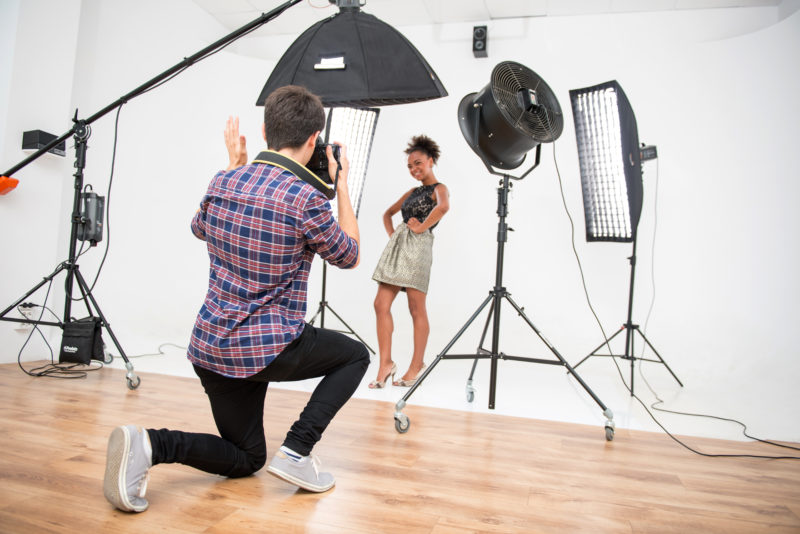
Use simple composition habits first. Keep horizons straight. Watch the edges of the frame. Avoid cutting through heads with background lines. Leave space in front of a person or animal looking sideways. Use doorways, paths, fences, windows and shadows to lead the eye.

The more you practise composition, the less you need to rely on cropping later.

3. Shoot different subjects at first

When you are new to photography, it is worth trying many subjects before choosing a niche. Photograph people, pets, food, buildings, landscapes, products, events, street scenes, details, interiors and everyday family life.

This does two useful things. First, it helps you discover what you enjoy. You may think you want to shoot weddings, then realise you prefer food, interiors or documentary family photography. Second, different subjects teach different skills.

Subject What it teaches
Portraits Light, connection, posing and background control.
Food Composition, colour, texture and natural light.
Landscapes Timing, weather, depth and clean framing.
Sport and pets Shutter speed, anticipation and movement.
Architecture Lines, symmetry, distortion and perspective.
Products Detail, reflections, surfaces and controlled lighting.

Do not worry if your early portfolio looks mixed. That is part of learning. Later, you can narrow it down.

4. Edit your photos, but do not hide behind editing

Editing is part of modern photography. It can improve exposure, colour, contrast, cropping and distractions. It can also ruin an image if you push it too far.

For beginners, a simple editing order works well:

  1. Straighten the image.
  2. Crop out distractions.
  3. Adjust exposure.
  4. Reduce harsh highlights.
  5. Lift shadows only where needed.
  6. Correct white balance if the colour looks too yellow or too blue.
  7. Add a small amount of contrast or sharpness.

Avoid using editing to rescue every weak shot. If a photo is badly focused, poorly timed or taken in terrible light, editing can only do so much. Keep a few unedited or lightly edited images in your portfolio too, especially if clients need to understand your natural style.
5. Build a portfolio around what you want to shoot

Your portfolio should not show everything you have ever photographed. It should show the work you want more of.

If you want to photograph families outdoors, do not fill your homepage with studio product shots. If you want weddings, show couples, emotion, details, speeches, venues and natural moments. If you dislike a type of work, do not make it the centre of your portfolio just because the images are technically good.

A beginner portfolio can be small. Ten strong images are better than fifty average ones. Choose photographs that are clear, consistent and relevant to the client or audience you want to attract.

6. Use travel and ordinary places as practice

You do not need exotic locations to practise photography. A local high street, park, beach, café, train station, market or family walk can teach you just as much as a major trip.

When you do travel, create a complete visual story rather than only taking obvious postcard shots. Include wide scenes, details, people, food, signs, textures, weather, quiet moments and anything that gives the place character.

A simple travel practice list might include:

  • One wide establishing shot
  • One close-up detail
  • One portrait or candid human moment
  • One food or drink image
  • One image showing movement
  • One image taken in difficult light
  • One image that captures the mood of the place

Remove unrelated travel links from this section. A coach-hire link does not naturally help someone learn photography and can make the article look like it exists mainly to place links.

7. Collaborate and ask for useful feedback

Photography improves faster when you work with other people. Collaborate with photographers, models, stylists, makeup artists, small businesses, families, musicians, food creators or local events. You will learn how to communicate, plan a shoot, solve problems and respond when conditions are not perfect.

Ask for specific feedback rather than general praise. Instead of asking “Do you like this?”, ask:

  • Is the subject clear?
  • Is the background distracting?
  • Does the light suit the mood?
  • Is the crop too tight or too loose?
  • Which image from this set is strongest?
  • What should I try differently next time?

Be careful whose feedback you follow. A working photographer, tutor or experienced editor can often give more useful advice than a social media comment from someone who simply likes bright colours or heavy filters.

Bonus tip: protect and organise your kit

Once you start travelling with cameras, lenses, batteries, cards and chargers, organisation matters. Keep memory cards in a case, charge batteries before shoots, back up your files and protect gear from rain, dust and knocks.

Beginner photography practice plan

Use this seven-day plan if you want a simple way to start practising.

Day Exercise Goal
Day 1 Photograph one object beside a window from five angles. Learn how light and position change the image.
Day 2 Take ten portraits in open shade. Practise flattering natural light.
Day 3 Photograph moving subjects with different shutter speeds. Understand blur and frozen action.
Day 4 Create a five-photo story of your local area. Think like an editor, not just a camera owner.
Day 5 Shoot one scene at different apertures. See how background blur and depth of field change.
Day 6 Edit three photos lightly and compare before and after. Learn restraint in editing.
Day 7 Choose your best five images and explain why they work. Build judgement and portfolio discipline.

Common beginner photography mistakes

  • Buying gear before learning light: better equipment cannot fix every weak photo.
  • Standing in one place: move closer, lower, higher or sideways before taking the shot.
  • Ignoring the background: clutter can ruin an otherwise good subject.
  • Over-editing: too much saturation, clarity or smoothing makes photos look artificial.
  • Showing everything: a strong portfolio is edited down, not filled up.
  • Not backing up files: keep copies of important images in more than one place.
  • Using unlicensed images online: only publish photos you own, commissioned, licensed or have permission to use.

Frequently asked questions

What should a beginner photographer learn first?

Start with light, focus and composition. Then learn how aperture, shutter speed and ISO work together. You do not need to master manual mode immediately.

Should beginners use Auto mode?

Yes. Auto mode is fine while you are learning. Move gradually into Aperture Priority, Shutter Priority and Manual mode when you understand what you want to control.

How often should I practise photography?

Short, regular practice is better than waiting for perfect conditions. Even 20 minutes with one subject can teach you something useful if you shoot deliberately.

Do I need Photoshop to be a good photographer?

No. Editing helps, but good photography starts with light, timing, focus and composition. Learn to make a strong image in camera, then use editing to refine it.

What should I put in my first photography portfolio?

Choose a small set of your strongest images that reflect the work you want to shoot next. Do not include every genre unless you genuinely want to offer every genre.

How do I get better feedback on my photos?

Ask specific questions about light, composition, focus, colour, crop and story. General praise is nice, but specific critique helps you improve.

Final thoughts

Photography improves through repetition, attention and honest editing. Learn the exposure basics, practise composition, shoot different subjects, collaborate with people and build a portfolio that points towards the work you want.

You do not need to become a professional overnight. Start by making one better photograph than you made last week. Then repeat that process until your eye, confidence and style begin to develop.

January 26, 2026 0 comments
0 FacebookTwitterPinterestEmail
Advice

Five Photography Myths

by Mark Bailey August 5, 2019
written by Mark Bailey

I’ve been browsing the internet for “Myths About Photography” and it seems everyone is pretty much saying the same thing, over and over. It appears in many cases people make up myths in order to throw out a blog post and try to get some hits for their web site.

That’s not to say there aren’t any myths, or at least misconceptions, however. So, here’s…

“Myth” #1: Photoshop is difficult to learn

Photoshop is really not that hard if you break it down into basic functions. It’s virtually impossible for anyone to know everything you can do with Photoshop but instead of being intimidated by it, all you have to do is start at the beginning. When first using Photoshop, all you have to do is use the brightness and contrast, colour saturation, and tools for removing dust and specks. In other words, just go with the basics.

Expert Photoshop users do not know everything there is to know so it really is a lifelong journey in moving to the next plateau of learning the software. If you start with the simple functions, you will begin to become familiar with the Photoshop environment and build up your confidence. There are plenty of free tutorials on the internet to help you along.

Myth #2: The light is bad

You could probably make the cynical point that the light is always bad for a particular type of photography. And therefore, that means the light is always good for a different photography scenario. The point everyone is trying to make that there is no such thing as bad light, just bad excuses for not shooting.

But if you’re in Cairo and you’re there for just one day and it was your lifelong dream to photograph the sphynx and yet there is a raging dust storm, it’s going to be tough trying to make lemonade out of that lemon. Still, taking pictures of the sphynx in a dust storm is better than no pictures at all. So yeah, a bad day of shooting is better than a good day of sitting at home or your hotel room because the day didn’t bring what you wanted.

Myth #3: The Creative Rut

We’ve all been there. Just not inspired or don’t feel like shooting. Again, everyone out there says this as an excuse to not go shooting. But you know what? Sometimes taking a step back is the best thing to do. You can’t be going 110% all the time. Creativity and productivity are things that run-in cycles. Don’t let the downturns put you into a funk. Know it will turn around and keep your camera ready for when you’re ready to go shooting again.

Myth #4: I’d take better pictures if I had a better camera

We’ve all heard that argument before. Give an amateur a high-end camera and he’s still going to take bad pictures. But better tools mean better results. So, forget the myth here and the point being made that has become a cliché. If you want to be a better photographer, it helps to have a good camera, but you need to learn how to use it. You can still take good pictures with low-end cameras and cell phones. It still boils down to knowing how to use the tools currently in your hands.

Myth #5: You can make a living at photography

Well, yes, you CAN make a living as a photographer but what do you call “living?” There are many good jobs out there in photography and congratulations if you have one but dreaming to be a full-time photographer is not always living the dream.

I know people who are full-time photographers but are barely getting by with minimum wages. They are struggling to make ends meet and are unable to afford basic things, yet they stubbornly hold on to the notion that “I am a photographer!” Life is not always fair and perhaps the real myth is thinking you are a full-time photographer when you might have a happier life doing something else and letting photography be more of a hobby. The term “starving artist” comes to mind and I’m sure many of you know people like that. Their lives are ruled by their art, but the art world can be a cruel place to be at the same time.

You may be a very good photographer and artist and still not make it, at least not full time. Find your niche and if it leads to full-time employment, great, but calling yourself a “photographer” is not the end to a means, either. You can still cater to the creative part of you and keep it real while still making a few extra bucks on the side with something like selling stock images. Don’t let “not making a living” at photography ruin your dream of simply being a great photographer.

So that’s it, five simple “myths” of photography but with a little twist compared to general blogs you see out there. photography is a craft and no matter how good you are, you can always do better. So, don’t let excuses and so-called myths affect your photography, just stay on the journey and see where it takes you.

August 5, 2019 0 comments
0 FacebookTwitterPinterestEmail
Advice

How to Make the Most of Your Professional Photos

by Mark Bailey January 8, 2018
written by Mark Bailey

As a professional photographer, one of your main concerns is how to maximise your photos for the best quality- your business depends on it.

When it comes to digital images, there are several tools that make this possible. In this piece, we will guide you through basic techniques to make your photos pop. It’s easy, even a beginner can have a go at it.

Once you master composition and exposure, you are well on your way to producing crisp quality, professional photos.

Capture interesting lighting

Lighting is easily the most underrated technique among beginners, however, experienced professionals don’t overlook it. When done well, it adds magic to the look and feel of an image. Lighting is the most important feature that will make any photograph look professional.

If you are shooting a portrait, one way to capture interesting lighting is to place the person in the shade so you can add uniform lighting on their face. Alternatively, you could make them back the sun so that their face is not raked by hard shadows.

It is also always worth having plastic sheets which can be used as light diffusers in order to help you catch interesting lights and shades.

Digital styling

It is not always enough to take photos and submit, particularly if you are building a professional portfolio. Add verve to your pictures with digital styling. It allows you to creatively alter the contrast, colours and exposure.

While some real photographers frown at Instagram filters, many will admit that images look better with digital styling. The same concept can be applied to your professional photos. Learn to play with lighting and photoshopping skills is a necessity.

Animate your photo augment

This is a cheeky photography skill and it is always fun to try. While the Ken Burns effect is a common way to bring your still image to life, it is quite overdone. Interestingly, you can use YouTube to give your 2D images 3D depth.

Tools like Movavi can teach you how to make a YouTube video. Simply open your multimedia file, add some special effects, incorporate fades, include a soundtrack and so on. An enhanced image is pixels better than a plain 2D one.

Unique perspective

Sometimes you will find an interesting subject, but the location is not nearly as interesting. Professional photos look the way they are because they are taken from a unique perspective. So instead of just accepting any position, see how you can manipulate the environment to augment the photo.

For instance, photograph the photo of a company founder from below- that is looking up at him or her to make them appear more powerful. Or, for a city skyline, take the picture from an altitude to give an aerial perspective of the whole city.

Finally, don’t forget the mood of the photo is just as important as the lighting. It is an ideal way to make you picture look more expressive. Always ask yourself, “what mood will this photo exude?” This way, you’ll avoid taking a photograph that comes out bland- a common mistake many photographers make.

As you build a portfolio worthy of professional value, you will be paving the way for bigger commissions, and hopefully more recognition in your craft.

January 8, 2018 0 comments
0 FacebookTwitterPinterestEmail
Photography Showcase

Your Top Photo Editing Software in 2017 Revealed

by Mark Bailey November 9, 2017
written by Mark Bailey

Do you simply take photos with your smartphone or are you a professional photographer that works in the studio? Everyone these days require a picture editor that helps you organize and edit your best photos in order to make them look more beautiful. With the invention of many photo editing software today, photoshopping a photo isn’t enough anymore especially for professional photographers who aim at bringing at the best effects in their photos. Editing a photo do not require any great skill particularly if you are using a photo editing software that has a simple user-friendly interface and below is a list of the top photo editing software in 2017 that not only offer incredible tools that help you make the best out of your photos but also are very affordable and simple to use.

Adobe Photoshop Lightroom

It’s a photo editing software that is more suitable for amateur and enthusiastic photographer because of its lack of certain features such as the ability to add, remove or alter image appearance and also file management features. Nevertheless, it is a photo processor and organizer that is perfect for enhancing and improving the appearance of digital photographs. It supports Windows and Mac OS and with its excellent user interface that contains a lot of tools, it tops the list of one of the best editing software.

ACD See Ultimate

Ultimate is the photo editing software that supports Windows, MacOS and IOS. It has a ton of tools that will do better in the hands of a professional photographer. Its quick adjustment layers, organizing tools, raw photo editing tools make ACD See Ultimate the perfect photo editing software for you to create fast and incredible photos. It allows easy manipulation of photos with its filter, adjustment and effect tools. Among all others, its digital asset management allows you to easily find, sort, organize and share your photos after work.

Optics Pro11

This is another professional photo editor that was developed by DxO Labs. It is majorly identified for its amazing optical corrections in photos. It’s easy user interface makes it one of the best choices of the finest photographers alongside with its ability to process raw files from the camera. It supports Microsoft Windows and IOS and has certain other features like a haze removal, noise reduction, highlight recovery and a lot of others that are known for their specific trademarked names.

Capture One Pro

This is the photo editing software that was developed by Phase One Company. It is very useful in professional situations because of its rather complicated features. Its raw file supporting feature makes it possible for you to tweak the images on your camera without causing any destructive damage to the files. It has a broad range of interesting tools that allows a photographer take complete control and advantage of the sorting, preserving and recovering processes involved in editing large amounts of photos in order to bring out the best in the photos.

November 9, 2017 0 comments
0 FacebookTwitterPinterestEmail
banner

Categories

  • Advice (36)
  • Brands (13)
  • Camera Bag (10)
  • Featured (13)
  • Features (1)
  • Marketing (14)
  • Online (6)
  • Photography Showcase (7)
  • Reviews (12)
  • Roundups (4)
  • Showcase (8)
  • Tips and Techniques (21)
  • Trends (14)
  • Uncategorized (1)

About Us

DC Mag is packed with expert advice, inspirational images, digital photography tips and techniques, photo editing lessons and video tutorials. This includes reviews, digital camera best buys, buying advice, news and more...

Editors Picks

  • 1

    The Most Influential Thought Leaders in the Digital Marketing Industry

    February 13, 2016
  • 2

    Unleash Your Digital Business

    February 13, 2016

Keep in touch

Facebook Twitter Pinterest Tumblr Youtube

@2022 - Dcmag. All Right Reserved.


Back To Top
DC Mag
  • Home
  • Advice
    • Photography Showcase
    • Tips and Techniques
  • Brands
  • Reviews
  • Roundups
  • Trends
  • Camera Bag
  • Marketing
  • Online
  • Contact Us